EN
USER MANUAL
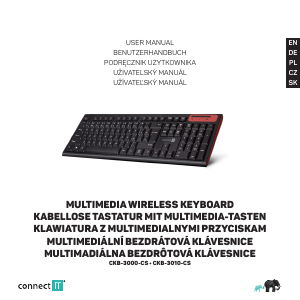
MULTIMEDIA WIRELESS KEYBOARD
CKB-3000-CS • CKB-3010-CS
Before putting this product into operation, please read carefully all the instructions, even if you are already familiar with using similar
products. Use the product only as described in this manual. Keep this manual in case you need it for future reference.
The electronic version of this user manual can be downloaded on the website www.connectit-europe.com.
We recommend keeping the original packaging of the product, invoice and warranty certifi cate at least for the time the warranty is valid.
When shipping the product, we recommend using the original packaging that the product was delivered in that will provide the best
protection for it from being damaged during transport.
1 Specifi cation
Technical specifi cations:
2.4 GHz wireless technology
13 multimedia keys
Height-adjustable
Standard keyboard layout
Operating range of nano receiver up to 10 m
Power: 2 × AAA batteries (included)
Interface: USB 1.1 and higher
Easy Plug & Play installation
Dimensions: 445 x 138 x 19 mm
Weight: 370 g
Compatibility:
Operating system: Microsoft Windows XP/Vista/7/8/10 and Mac OS
This product is compatible with Mac OS although some features unsupported by Mac OS may not work properly.
2 Installation
Installation of batteries:
1. Remove the battery cover on the bottom side of the keyboard.
2. Insert 2x AAA batteries into the keyboard and be sure that you are inserting the batteries in correct direction according to their
polarity.
Close the battery cover.
Installation of USB receiver to the computer:
Insert the USB receiver to the available USB port and wait for automatic installation of drivers.
3 Overview
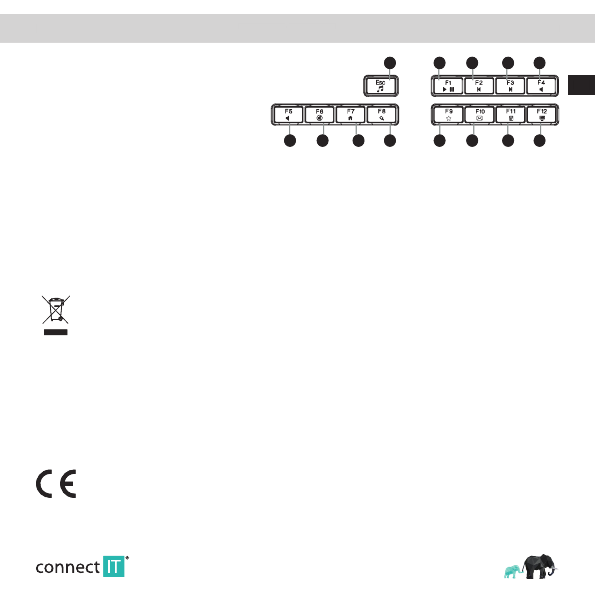
Multimedia functions
Activate multimedia functions with key shortcuts in combination with the Fn key.
1. Music player
2. Play/Pause
3. Previous track
-
+
1 2
106
3
117
4
128
5
139
4. Next track
5. Volume (-)
6. Volume (+)
7. Mute sound
8. Web browser
9. Search
10. Favourite
11. E-mail client
12. Keyboard
13. This computer
Support of keyboard‘s multimedia functions depends on used operating system and software.
4 Troubleshooting
We recommend connecting this device straight to a USB port on your computer.
If this device is plugged in to a USB hub, make sure that the USB hub and the USB port to which it is connected can provide this
device and other devices connected to the same USB hub with enough power.
Alternatively, we recommend using an external power source with the USB hub (if the USB hub supports such functionality).
INSTRUCTIONS AND INFORMATION REGARDING THE DISPOSAL OF USED PACKAGING
Dispose of packaging material at a public waste disposal site.
DISPOSAL OF USED ELECTRICAL AND ELECTRONIC APPLIANCES
The meaning of the symbol on the product, its accessory or packaging indicates that this product shall not be treated as
household waste. Please, dispose of this product at your applicable collection point for the recycling of electrical & electron-
ic equipment waste. Alternatively in some states of the European Union or other European states you may return your prod-
ucts to your local retailer when buying an equivalent new product. The correct disposal of this product will help save valuable
natural resources and help in preventing the potential negative impact on the environment and human health, which could
be caused as a result of improper liquidation of waste. Please ask your local authorities or the nearest waste collection
center for further details. The improper disposal of this type of waste may fall subject to national regulations for fi nes.
For business entities in the European Union
If you wish to dispose of an electrical or electronic device, request the necessary information from your seller or supplier.
Disposal in other countries outside the European Union
If you wish to dispose of this product, request the necessary information about the correct disposal method from local
government departments or from your seller.
This product meets all the basic EU regulation requirements that relate to it.
EU declaration of conformity is available on www.connectit-europe.com.
MULTIMEDIA WIRELESS KEYBOARD
Support of keyboard‘s multimedia functions depends on used operating system and software.
We recommend connecting this device straight to a USB port on your computer.
If this device is plugged in to a USB hub, make sure that the USB hub and the USB port to which it is connected can provide this
device and other devices connected to the same USB hub with enough power.
Alternatively, we recommend using an external power source with the USB hub (if the USB hub supports such functionality).
INSTRUCTIONS AND INFORMATION REGARDING THE DISPOSAL OF USED PACKAGING
Dispose of packaging material at a public waste disposal site.
DISPOSAL OF USED ELECTRICAL AND ELECTRONIC APPLIANCES
The meaning of the symbol on the product, its accessory or packaging indicates that this product shall not be treated as
household waste. Please, dispose of this product at your applicable collection point for the recycling of electrical & electron-
ic equipment waste. Alternatively in some states of the European Union or other European states you may return your prod-
ucts to your local retailer when buying an equivalent new product. The correct disposal of this product will help save valuable
natural resources and help in preventing the potential negative impact on the environment and human health, which could
be caused as a result of improper liquidation of waste. Please ask your local authorities or the nearest waste collection
center for further details. The improper disposal of this type of waste may fall subject to national regulations for fi nes.
For business entities in the European Union
If you wish to dispose of an electrical or electronic device, request the necessary information from your seller or supplier.
Disposal in other countries outside the European Union
If you wish to dispose of this product, request the necessary information about the correct disposal method from local
government departments or from your seller.
This product meets all the basic EU regulation requirements that relate to it.
EU declaration of conformity is available on www.connectit-europe.com.


Dołącz do dyskusji na temat tego produktu
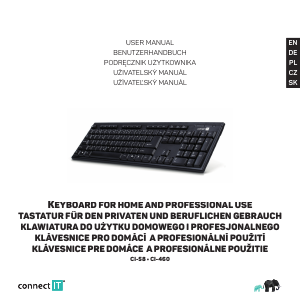
Tutaj możesz podzielić się swoją opinią na temat Connect IT CKB-3000-CS Klawiatura. Jeśli masz pytanie, najpierw dokładnie przeczytaj instrukcję. Zapytanie o instrukcję można złożyć za pomocą naszego formularza kontaktowego.