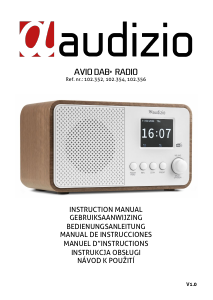
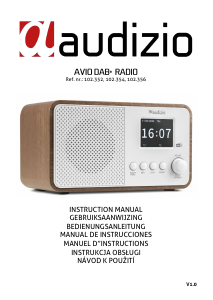
Instrukcja Audizio 102.352 Avio Radio

Potrzebujesz instrukcji dla swojego Audizio 102.352 Avio Radio? Poniżej możesz bezpłatnie obejrzeć i pobrać instrukcję w formacie PDF w języku polskim. Ten produkt ma obecnie zadane 2 pytania, 0 komentarzy i 0 głosów. Jeśli nie jest to podręcznik, którego szukasz, skontaktuj się z nami.

Czy Twój produkt nie działa, a w instrukcji obsługi brakuje rozwiązania Twojego problemu? Udaj się do Repair Café, gdzie naprawisz swój sprzęt za darmo.

Instrukcja

Loading…

5
CAUTION! Carefully unpack the box upon receipt. Check the contents to ensure that all parts are present and have been
received in good condition. Notify the shipper immediately and retain packaging material if any parts appear damaged from
shipping or the package itself shows signs of mishandling. Save the package and all packaging materials. If the product
must be returned, it is important that the product is returned in the original factory box and packaging. If the device has
been exposed to drastic temperature fluctuation (e.g. after transportation), do not switch it on immediately. The arising
condensation water might damage your device. Leave the device switched off until it has reached room temperature.
The label on the back/under side of the product indicates the mains voltage to which it must be connected. Check that the
mains voltage corresponds to this. Any other voltage than the one indicated may cause irreparable damage to the unit. The
unit must also be connected directly to the mains voltage and no dimmer or adjustable power supply may be used.
Always connect the device to a protected circuit (circuit breaker or fuse). Make sure the device has an appropriate
electrical ground to avoid the risk of electrocution or fire.
1. Display
2. Power/Menu
Press to put the power on/off
Press to enter menu
Press to toggle within the menu
3. Info
Press to show information of the channel
4. Scan
Press to search for stations
Press and hold for Scan in FM mode
Press to scan for stations in DAB mode
Press for play/pause in BT/USB mode
5. Preset
Press and hold to preset station
Press to show list of favourite stations
Press for Repeat one/Random loop in USB mode
6. Volume/Up/OK/Down
Rotate to increase/decrease volume
Press to confirm
Rotate to scroll in settings + submenu’s
Press and hold to disconnect in BT mode
Press the 'Volume/Up/OK/Down' button on the product. Rotate
the volume button in BT and USB modes to select the previous or
next track
7. Antenna
8. Aux in
3.5mm jack input for auxiliary play
9. USB port
10. DC in
12V power socket for connecting the supplied power adapter
• Remove the radio from the package box.
• Plug in the power adapter. Press the [Power/Menu] button on the front side.
Caution: Use only the adapter supplied with the radio. Connecting a power supply with a different rating can cause
permanent damage to the radio and may be hazardous.
If there is Digital Audio Broadcasting (DAB) in your area, the unit can pick up the DAB stations.
Place the radio close to the window and extend the antenna as far as it can go to get the best reception. Sometimes you
may need to adjust the direction of the antenna to improve reception.
Press [Menu] to enter the menu. Rotate the button [Volume/Up/OK/Down] to select DAB. Press [Volume/Up/OK/Down] to
confirm.
Pobierz instrukcję w języku polskim (PDF, 1.34 MB)
(Apelujemy o dbanie o środowisko i drukowanie instrukcji tylko wtedy, gdy jest to niezbędne)

Loading…

Ocena

Podziel się z nami swoją opinią na temat Audizio 102.352 Avio Radio i oceń urządzenie. Chcesz podzielić się swoimi doświadczeniami z tym produktem lub zadać pytanie? Zostaw komentarz na dole strony.
Czy jesteś zadowolony z Audizio 102.352 Avio Radio?
Tak Nie
Zostań pierwszą osobą, która oceni ten produkt
0 głosów

Dołącz do dyskusji na temat tego produktu

Tutaj możesz podzielić się swoją opinią na temat Audizio 102.352 Avio Radio. Jeśli masz pytanie, najpierw dokładnie przeczytaj instrukcję. Zapytanie o instrukcję można złożyć za pomocą naszego formularza kontaktowego.

Więcej o tej instrukcji

Rozumiemy, że miło jest mieć papierową instrukcję obsługi Audizio 102.352 Avio Radio. Zawsze możesz pobrać instrukcję z naszej strony internetowej i wydrukować ją samodzielnie. Jeśli chcesz otrzymać oryginalną instrukcję, zalecamy skontaktowanie się z Audizio. Być może będą w stanie dostarczyć oryginalną instrukcję. Szukasz instrukcji swojego Audizio 102.352 Avio Radio w innym języku? Wybierz preferowany język na naszej stronie głównej i wyszukaj numer modelu, aby sprawdzić, czy jest on dostępny.

Dane techniczne

Marka Audizio
Model 102.352 Avio
Kategoria Radia
Typ pliku PDF
Rozmiar pliku 1.34 MB

Wszystkie podręczniki dla Audizio Radia
Więcej podręczników Radia

Często zadawane pytania dotyczące Audizio 102.352 Avio Radio

Nasz zespół wyszukuje przydatne informacje na temat produktu i udziela odpowiedzi na często zadawane pytania. Jeśli znajdziesz nieścisłości lub błędy w naszych odpowiedziach na pytania, poinformuj nas o tym przy pomocy naszego formularza kontaktowego.

Co to jest DAB+? Zweryfikowany

DAB+ jest następcą sygnału FM i oznacza Digital Audio Broadcasting. Jest to sygnał cyfrowy, który pozwala na więcej kanałów, ma większy zasięg i pozwala na łatwiejsze przełączanie między kanałami.

To było pomocne (304) Czytaj więcej

Jaka jest różnica między FM a AM? Zweryfikowany

FM i AM to obie formy modulacji używane do przesyłania sygnału. FM oznacza modulację częstotliwości, a AM oznacza modulację amplitudy. AM jest najstarszą formą modulacji. Największą różnicą jest to, że sygnał FM jest znacznie silniejszy niż sygnał AM.

To było pomocne (244) Czytaj więcej
Instrukcja Audizio 102.352 Avio Radio

Produkty powiązane

Powiązane kategorie

×
Download